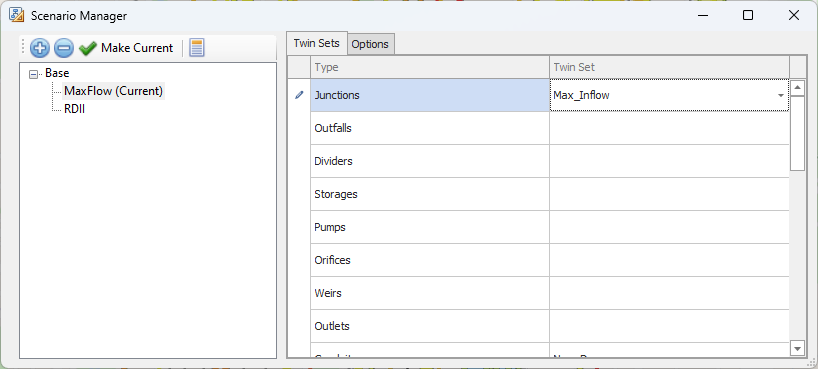
In the AquaTwin Scenario Manager, scenarios are organized using a parent-child hierarchical structure. Twin Sets are used to link different scenarios together dynamically, making it easier to manage and make changes to scenarios.
Add a new scenario.
Delete the selected scenario.
Make the selected scenario active (can also double click to make active).
This will open a detailed report from the active scenario model run.
The AquaTwin Scenario Manager allows each scenario to have unique data for individual assets. Here's how it works:
When you link scenarios in a Twin Set, any change you make to an asset in one scenario is automatically updated in all other scenarios within that Twin Set. This automatic synchronization means that if you modify an asset in one scenario, you don’t need to manually replicate this change in each connected scenario.
There is a specific tab in the Scenario Manager where you can assign Twin Sets to each asset in a scenario.
It's important to note that not every asset in a scenario needs to be part of a Twin Set. If an asset doesn’t have a Twin Set, then any changes made to it will only apply to that specific scenario and won't affect any other scenarios. This is because it isn't dynamically linked to other scenarios through a Twin Set.
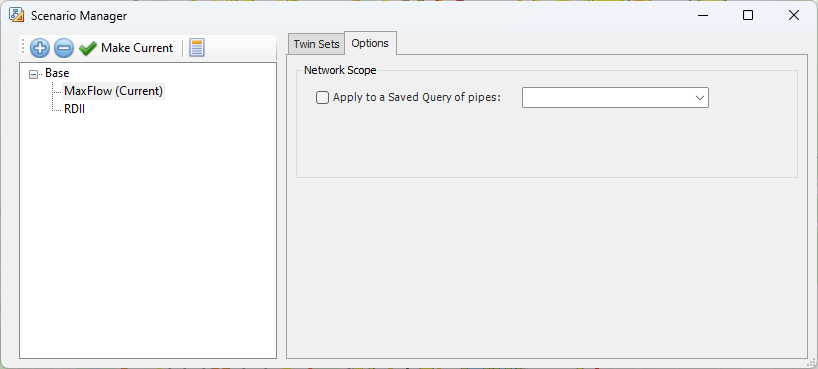
In the Options tab within a scenario in the AquaTwin Scenario Manager, you will find two additional choices:
By selecting this, the model focuses solely on the pipes in your Saved Query, enabling more targeted analysis.